Offline financial-statement software for Indian practice

From trial balance to signed-ready statements.

MAPNOX turns any Tally or ERP trial balance into a complete, Schedule III–compliant set of accounts — Balance Sheet, Profit & Loss, Cash Flow and Notes — for every entity type. It’s a Windows desktop application: your data is never uploaded, and everything runs on your own computer, fully offline.

Installed desktop software — not a website; works with no internet at all Your trial balance is never uploaded — you open it inside MAPNOX, on your PC The AI runs on your own machine — no cloud, no GPU, no account
MAPNOX · classifying on-device
Trial-balance ledger
Axis Bank Current A/c Dr
reasoningnote
Financial-statement note
Cash & Cash Equivalents ✓
Debit balance → asset
0
Entity types supported
0
Frameworks — GAAP & Ind AS
0
Import sources
0
Offline & private
See it work

From trial balance to Schedule III, the way it happens in MAPNOX.

A working replica of the MAPNOX screens with sample figures: import a trial balance, let MAPNOX Fusion map it, confirm what it is unsure of, and watch the statement build and tie.

1/5
MAPNOXIndian GAAP · Schedule III Financial Statements

Trial Balance

Import Trial BalanceSync to Notes To AccountsMAPNOX Fusion (classify)

An interactive replica of the MAPNOX screens, with sample figures — not a client file. Row labels are the ones MAPNOX prints.

Real moments · real screens

You know these moments. Here’s MAPNOX in each of them.

Every screen below is a real fragment of the software, with the part that matters marked. The whole of it is yours to see in a demo.

01 The disclosure you almost missed

“Did they discontinue a business? Was there an amalgamation?”

MAPNOX asks what applies to each client, and every question names the standard behind it. Yes includes what it covers; No leaves it out.
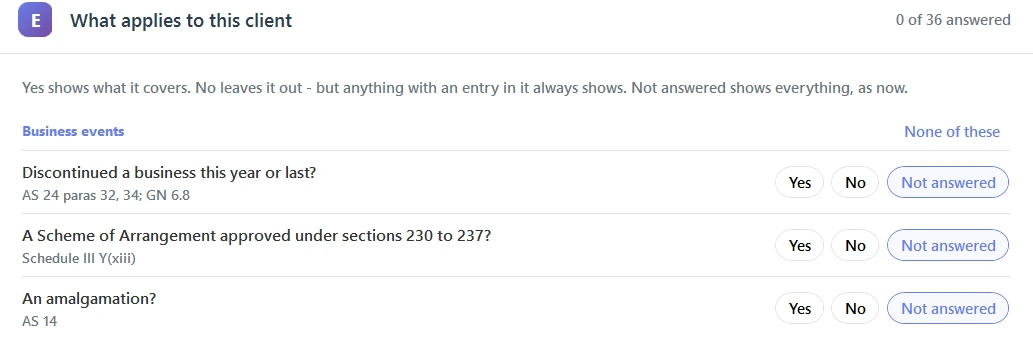

MAPNOX 1. Create Profile screen: the disclosure you almost missed
Real MAPNOX screen
02 A practice is never just companies

“Next file: a partnership firm. Then a trust. Then an HUF.”

Seven entity types in one tool. Choose the nature of the entity, and the form, the cover and every statement follow it.

MAPNOX 1. Create Profile screen: a practice is never just companies
Real MAPNOX screen
03 Indian accounts, read the Indian way

“Lakhs and crores, please — and negatives in brackets.”

Indian digit grouping and Schedule III brackets, with a live preview before you save.

MAPNOX 10. Configurations screen: indian accounts, read the indian way
Real MAPNOX screen

Actual MAPNOX screens, shown in fragments — a sample company, not a client file.

01
Capabilities

Everything a compliant statement needs — in one place.

Coverage

Every entity type

One engine for all seven natures — the format, capital account and disclosures adapt automatically.

CompanyLLPPartnership firmProprietorHUFAOP / BOITrust
Frameworks

Indian GAAP & Ind AS

Schedule III Division I, and Division II for Ind AS — with SOCIE, OCI and the Ind AS notes, re-presented from the same trial balance.

Intelligence

On-device AI — MAPNOX Fusion

MAPNOX Fusion, the reasoning model that maps each ledger to its Schedule III note, runs inside the app on a normal Windows laptop — no GPU, no internet, no account.

Disclosure

Complete Notes to Accounts

Every Schedule III note, prior-year comparatives, the financial-ratios note, and the regulatory disclosures.

Statements

Cash Flow & Consolidation

Cash-Flow statement built automatically, and group consolidation under AS 21 with non-controlling interest.

Sources

Import from anywhere

Nine accounting systems read natively, plus a generic reader for the rest — no template to fill.

Assurance

Built-in checks

Balance-Sheet, Cash-Flow and cross-footing tie-outs catch the errors before you sign, not after.

Tax

Taxation layer

An opt-in tax provision flows PBT→PAT into the statements and the ratios — self-balancing, always tied.

02
Private by design

Your clients’ numbers never leave your desk.

No upload, everTrial balances and statements stay on local disk. There is no server to send them to.
Works without internetClassification and every calculation happen on-device — nothing to connect to.
No account, no telemetryInstall and open. Nothing about your work is collected or transmitted.

Made for practising Chartered Accountants and audit teams in India — by a practising CA, built inside a real practice on real client files, not adapted from generic software.

03
Questions

The things people ask first.

Does my clients’ data leave my computer?

No. MAPNOX is a desktop application — the AI classification and every calculation happen on your own machine. There is no website to log into and no server to upload to, so your trial balance and the finished statements never leave your computer. That is the whole point: an audit file’s confidentiality, by construction.

Which entity types and frameworks does it handle?

All seven Indian entity natures — Company, LLP, Partnership firm, Proprietor, HUF, AOP/BOI and Trust — under Schedule III Division I (Indian GAAP). Companies on Ind AS are supported under Division II, with SOCIE, OCI and the Ind AS notes. The format, capital account and disclosures adapt to the nature automatically.

How accurate is the AI, and can I trust the numbers?

Two honest answers. The numbers are deterministic — totals, notes and statements are computed from your trial balance and reconciled with built-in tie-outs (Balance Sheet, Cash Flow and cross-footing), so a figure is either tied or flagged, never silently wrong. The classification of a ledger to a note is AI-assisted: it is right on the ordinary cases and, crucially, it flags the genuinely ambiguous ones for your review instead of guessing. You sign; MAPNOX does the mechanical work.

What do I feed it — and do I need a template?

Your trial balance. MAPNOX reads exports from nine accounting systems natively — Tally, QuickBooks, Xero, Zoho, Odoo, Sage, Busy, Marg and more — plus a generic reader and a plain Excel-paste fallback. No template to fill, no fixed chart of accounts to conform to.

Does it need a GPU, an internet connection, or an account?

None of the three. The reasoning model is sized to run on a normal Windows laptop with no dedicated graphics card, fully offline. There is no sign-up, no login and no telemetry — you install it and open it.

Can I try it?

Yes — request a demo below and we’ll walk you through it on your own kind of files. MAPNOX is built and maintained inside a working CA practice, so the conversation is with someone who prepares these statements too.

Request a demo

See MAPNOX on your own trial balance.

Tell us a little about your practice and we’ll walk you through it — on your files, at your pace.

Your details go only to MAPNOX, to arrange your demo.
Thanks — your request has reached us. We’ll be in touch shortly.
